Level 24 / 阅读练习
Vue 入门篇:模板 指令 组件 响应式
用 Vue 3.5、script setup、模板、指令、组件和响应式写用户管理页的第一版。
Progress
阅读中
0/4 步完成 / 阅读后完成练习才算通关
Practice
本关怎么过
- 读完正文后确认完成阅读
- 完成 3 道选择题练习
- 答错时看解释,再回到正文补理解
一句话:Vue 入门先抓住一件事,模板绑定响应式数据,数据变了,页面自动跟着变。
第 5 篇 / 共 12 篇。
本篇学完你会:用 Vue 3.5 + script setup + TypeScript 写出用户管理页面的静态列表、指令、组件、props 和基础响应式。
1. Vue 是什么
Vue 是一个渐进式前端框架。你可以把它想成“页面说明书”:模板说明页面长什么样,响应式数据说明页面用什么数据。
核心公式:
模板 + 响应式数据 = 自动更新的页面
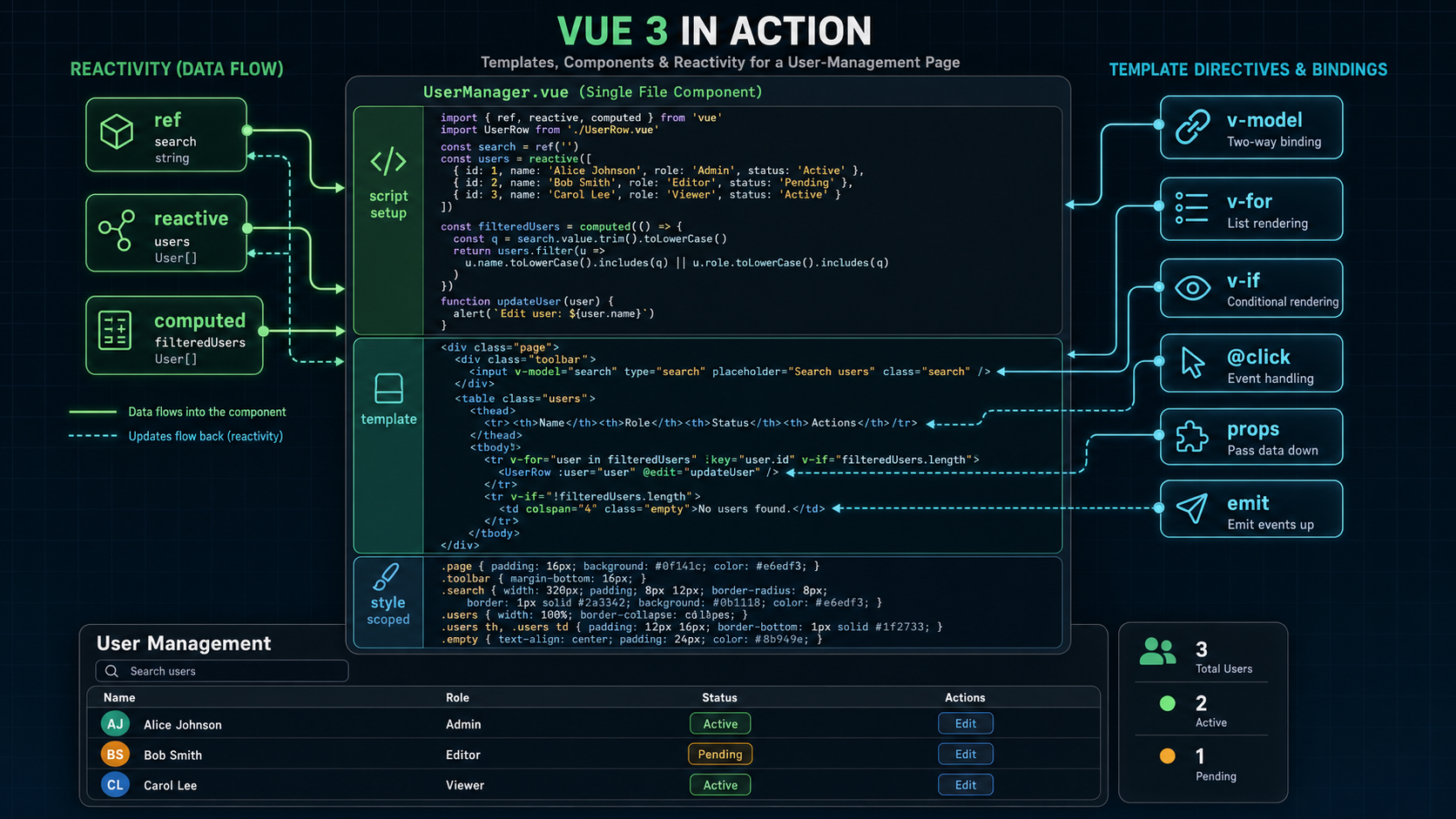
2. 用户管理案例的第一步
同样做用户管理页:
标题
搜索框
用户列表
状态标签
当前选中用户
类型:
type UserStatus = 'active' | 'disabled';
type User = {
id: number;
name: string;
email: string;
role: 'admin' | 'member';
status: UserStatus;
};
3. 单文件组件是什么
Vue 常用 .vue 文件:
<script setup lang="ts">
const title = '用户管理';
</script>
<template>
<h1>{{ title }}</h1>
</template>
<style scoped>
h1 {
font-size: 24px;
}
</style>
三个区域:
| 区域 | 大白话 |
|---|---|
script setup |
写逻辑 |
template |
写页面结构 |
style scoped |
写只影响当前组件的样式 |
4. 模板和指令
Vue 模板里常用指令:
| 指令 | 用途 |
|---|---|
v-if |
条件显示 |
v-for |
循环列表 |
v-model |
表单双向绑定 |
v-bind / : |
绑定属性 |
v-on / @ |
绑定事件 |
搜索框:
<input v-model="keyword" placeholder="搜索用户名" />
按钮事件:
<button @click="createUser">新增用户</button>
5. ref 和 reactive
ref 适合单个值:
<script setup lang="ts">
import { ref } from 'vue';
const keyword = ref('');
const selectedId = ref<number | null>(null);
</script>
模板里不用写 .value:
<p>当前搜索:{{ keyword }}</p>
reactive 适合对象:
const query = reactive({
keyword: '',
status: 'all' as 'all' | 'active' | 'disabled'
});
大白话:ref 像一个盒子,JS 里要用 .value 打开;模板里 Vue 自动帮你打开。
6. props 和 emit
子组件接收用户:
<script setup lang="ts">
defineProps<{
user: User;
}>();
</script>
<template>
<li>
<strong>{{ user.name }}</strong>
<span>{{ user.email }}</span>
</li>
</template>
子组件通知父组件:
<script setup lang="ts">
const emit = defineEmits<{
select: [id: number];
}>();
</script>
<template>
<button @click="emit('select', user.id)">选择</button>
</template>
大白话:props 是父传子,emit 是子喊父。
7. 列表渲染和条件渲染
用户列表:
<ul v-if="filteredUsers.length">
<UserRow v-for="user in filteredUsers" :key="user.id" :user="user" @select="selectedId = $event" />
</ul>
<p v-else>暂无用户</p>
计算过滤结果时,需要先有响应式的用户列表,并引入 computed:
import { computed, ref } from 'vue';
const users = ref<User[]>([
{ id: 1, name: '小明', email: 'ming@example.com', role: 'admin', status: 'active' },
{ id: 2, name: '小红', email: 'hong@example.com', role: 'member', status: 'disabled' }
]);
const filteredUsers = computed(() => users.value.filter((user) => user.name.includes(keyword.value)));
computed 的意思是:根据已有数据算出新数据,并且自动缓存。
8. 常见错误
| 错误 | 后果 | 修正 |
|---|---|---|
JS 里忘记 .value |
取不到 ref 值 | keyword.value |
v-for 不写 key |
列表更新不稳定 | 用 user.id |
| 直接改 props | 数据方向乱 | 用 emit 通知父组件 |
| reactive 解构丢响应式 | 页面不更新 | 用 toRefs 或避免随意解构 |
9. 下一步怎么学
本篇你已经学到:
| 概念 | 大白话 |
|---|---|
| SFC | 一个文件放逻辑、模板、样式 |
| 指令 | Vue 模板里的特殊命令 |
| ref | 响应式盒子 |
| reactive | 响应式对象 |
| props | 父传子 |
| emit | 子通知父 |
| computed | 根据数据自动算数据 |
Checkpoint
读完后做题闯关
读完后做选择题检验理解,答错会显示解释。
先完成阅读
读完正文后点击“我已读完,进入练习”,题目会变成可答状态。